

If your Wi-Fi is solid in the kitchen but drops the second you walk upstairs, you’re not alone. Same story if your doorbell camera lags, your smart TV buffers, or your work calls glitch at the worst time.
A lot of homeowners assume the fix is simple: upgrade the internet plan, buy another extender, cross your fingers. Sometimes that helps. Often, it doesn’t.
Here’s the truth: “bad Wi-Fi” is frequently a home setup problem. Power, placement, load, and the way your devices are spread across the house can quietly stack the odds against you. That’s where a residential electrician becomes surprisingly useful.
This guide breaks down practical, real-home fixes for Ontario houses, especially older ones that weren’t built for today’s tech.
Why “bad Wi-Fi” is often a home setup problem
Dead zones and device placement
Wi-Fi signals weaken with distance and obstacles. Thick plaster, concrete, ductwork, and even certain layouts can create dead zones. If your router is stuck in a corner because it’s the only spot with an outlet and modem access, your signal is already fighting uphill.
Many homes also have “tech clusters” now: a living room with a smart TV, console, soundbar, and streaming box. A home office with computer gear. A security camera system. All of that needs stable power and smart placement, not a tangle of cords.

Interference and the 2.4 GHz reality
A lot of smart home gear still uses the 2.4 GHz band because it reaches farther. The downside is that 2.4 GHz is a busy neighbourhood: Wi-Fi shares space with other common wireless tech, and interference can happen in everyday life. Even microwaves can be part of the interference conversation because they operate in the same general band area.
Canada’s spectrum regulator also notes that interference issues can be worse when devices aren’t certified for use in Canada. Translation: cheap, off-brand gear can create headaches.
None of this means you’re stuck. It means the fix is often a mix of smarter placement, safer power access, and fewer “workarounds.”
Electrical services that make smart homes run smoother
Smart homes aren’t just about apps and Wi-Fi. They’re also about solid electrical foundations.
The systems inside smart devices rely on good design and stable power delivery to work properly. If you want a simple explanation of why the “behind the scenes” hardware matters in smart homes, this article gives a helpful overview:
https://www.wonderfulpcb.com/blog/electronic-design-smart-homes-automation-efficiency-security/
Now let’s talk about what actually helps in your house.
Better outlet placement for routers, TVs, and workstations
One of the most overlooked causes of weak home tech performance is this: the router and core devices aren’t located where they should be, because the power and connections aren’t there.
A residential electrician can help by:
- Adding outlets where you actually need them (office walls, TV zones, stair landings, finished basements).
- Creating dedicated circuits for higher-demand areas so your office gear or entertainment setup isn’t sharing power with a heavy appliance.
- Reducing the need for extension cords that force awkward router placement.
When your router can live in a more central, open spot (instead of behind a TV or jammed beside a panel), coverage often improves in a very noticeable way.
Reducing overloaded circuits and nuisance trips
If your breakers trip when you’re running a space heater and a workstation, or your lights flicker when the microwave starts, that’s a sign your electrical system is under stress.
Overloaded circuits don’t just feel annoying. They can create unstable power conditions that sensitive electronics don’t love. And if you’re constantly “sharing” one outlet with a stack of adapters, you’re putting pressure on a circuit that may already be maxed out.
Ontario homeowners often discover this problem once they add modern loads like home offices, EV charging, or more kitchen appliances. The Electrical Safety Authority’s homeowner guidance specifically calls out that EVs can add significant load and your panel may need to handle more capacity.
Cleaner installs: fewer power bars, fewer cords, less risk
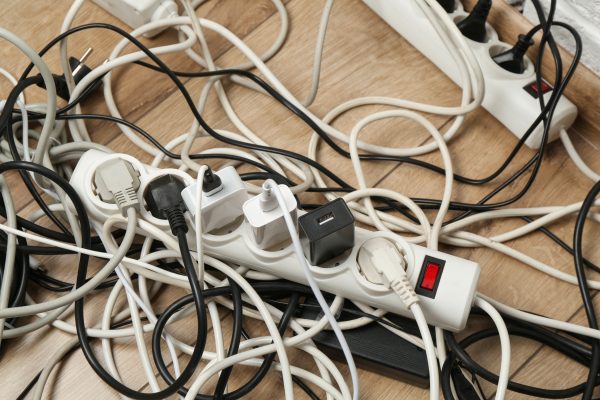
When you have too many extension cords and power bars, it’s usually a symptom of a layout that doesn’t match how you live.
The goal isn’t to shame the power bar. It’s to reduce the situations that make them risky:
- Daisy-chained power bars behind a TV stand
- Extension cords used as a permanent solution
- High-draw devices plugged into strips because there are no better options
A residential electrician can improve safety and function by adding the right number of outlets in the right places, and by planning circuits around how rooms are actually used.
If you want an authoritative reminder on what power strips can and can’t do, ESFI notes that power strips do not automatically provide surge protection, and they do not “create more power” for a location.
Surge protection for sensitive electronics
Smart home gear is basically a house full of small computers. Routers, smart TVs, doorbell cameras, hubs, and NAS drives can all be affected by surges.
A residential electrician can talk you through options like whole-home surge protection and device-level protection for the places that matter most (office, entertainment, networking area). And they can help you avoid the common mistake of assuming any strip equals surge protection.
Older homes in Ontario: common roadblocks for modern tech
Limited outlets, older panels, and higher demand
If your home is older, it was designed for a different reality: fewer devices, fewer charging needs, and far less demand per room. That shows up today as:
- Not enough outlets in bedrooms and living areas
- One circuit serving too much of the floor
- Layouts that force the modem/router into a weird location
- A panel that’s doing its best, but the household load has changed
Even if your home “feels fine,” modern usage can expose the gap.
EV chargers, offices, and smart devices add load fast
Lots of Ontario homeowners add an EV charger, finish a basement, or build a home office and suddenly the electrical system has a new job.
J.D. Patrick Electric lists EV charger installation as one of their services in London, Ontario, which is a good example of a modern upgrade that can change household electrical demand.
This doesn’t mean every home needs a major overhaul. It means it’s smart to plan upgrades around real loads, not guesses.
What a residential electrician can do (without turning your home into a construction zone)
Most homeowners avoid calling because they assume it’ll be messy or expensive. In reality, there’s usually a “right-sized” solution.
Quick wins
- Add outlets where you’re currently relying on extension cords
- Improve the power setup for your router/modem area
- Fix or replace worn outlets that don’t hold plugs firmly
- Install better lighting or switched outlet options so you’re not stacking adapters
Medium upgrades
- Add a dedicated circuit for a home office or entertainment zone
- Tidy up and modernize wiring for key areas that power your tech
- Add surge protection strategy for expensive electronics
Bigger upgrades
- Panel or service upgrades when demand has outgrown the system
- Planning power for renovations, basements, or additions
- Wiring support for EV charging, outdoor tech, or multi-device setups
If you’re wondering whether your home is “at that stage,” start with the symptoms you can see: frequent trips, warm outlets, buzzing, flickering, or that constant reliance on power bars.
When to call now (not “sometime later”)
Call a licensed pro sooner if:
- Breakers trip repeatedly when normal household devices run
- Outlets feel warm, spark, or smell off
- You’re using extension cords as permanent wiring
- You’re adding major loads (EV charger, basement suite, hot tub, office build-out)
- Your smart devices fail unpredictably and you’ve already tried the basic Wi-Fi fixes
Next steps: make your home tech reliable and safer
If your Wi-Fi is unreliable in certain rooms, you don’t have to keep throwing gadgets at the problem. A smarter home setup often starts with safer power access, better device placement options, and electrical capacity that matches how you live now.
J.D. Patrick Electric provides 24/7 electrical services in London, Ontario, including support across sectors and common modern upgrades.
When you’re ready, start here:
- Learn what’s possible for your home: Services
- Book a conversation about your setup and goals: Contact
FAQs
Can a residential electrician actually improve Wi-Fi?
Yes—by adding properly placed outlets, reducing unsafe cord setups, and helping you place routers and hubs where they perform better, not just where an outlet happens to exist.
Why do my smart devices keep disconnecting?
It’s often a mix of weak signal in certain areas, interference on common bands, and unstable power setups (like overloaded circuits or crowded power bars).
Is it safe to run a home office off power bars and extension cords?
It can become risky if it’s permanent, overloaded, or daisy-chained. A better solution is adding outlets and, if needed, a dedicated circuit for your office equipment.
Do older Ontario homes need electrical upgrades for smart devices?
Not always, but older homes often have fewer outlets and circuits than modern living demands. An electrician can assess whether targeted upgrades would help.
Should I upgrade my panel if I’m adding smart home tech or an EV charger?
Sometimes. EV charging can add significant load, and guidance from Ontario’s Electrical Safety Authority notes your panel may need to handle the extra demand.